
Unlock Your Data with Howso’s Bring Your Own Data Demo
Makana Dumlao

Howso’s Bring Your Own Data (BYOD) demo is a hands-on experience designed to make AI accessible, transparent, and actionable.
Looking to explore the world of Understandable AI®? This interactive experience is perfect for developers, data scientists, business professionals, and tech enthusiasts looking for AI tools. Whether you upload your own data or use one of our sample datasets, this hands-on demo will guide you through every step of the journey—from data preparation to making insightful predictions.
Here’s what you can expect from the Howso BYOD demo.

Introduction to the BYOD demo.
1. Learn
The Learn phase is all about making your data AI-ready. You’ll load or select your data, define its attributes, and train it to gain valuable insights. This foundational step ensures that you understand your data before moving into prediction and inference.
2. Generate
In the Generate phase, you’ll use AI to make inferences with full attribution, providing you with not only results but also clear explanations of how those results were derived. This attribution is a cornerstone of Howso’s approach to transparent and explainable AI.

Don’t have your own data but want to experience the demo? Not a problem! On the “Load your data” page, click on “Select sample.” Here, you’ll find 4 example datasets that we’ve provided for you to use.
A Step-by-Step Walkthrough of BYOD Playground
1. Upload Your Data
Start by uploading your dataset from your device or choosing a sample. You can preview the data to ensure its correctly formatted. At minimum your data should have at least four features across ten rows. Don’t worry about privacy – your data never leaves the device.
2. Define Your Data
Next, review Howso’s initial inferences about your dataset’s attributes. This step allows you to adjust the configurations and fine-tune your data’s attributes to ensure accuracy before the training begins.
3. Train Your Data
Once your data is set, Howso Engine analyzes and trains your data directly within your browser. The demo runs on a single thread in the browser. Howso’s open-source solutions provide scalable options for performance improvements for those looking for a deeper exploration. When training completes, you’ll receive Insights—such as prediction statistics and a feature importance chart. You’ll learn which features impact your data most.
4. Get Insights
Choose a feature to target and get real-time statistical insights. By setting other features as context, you can explore prediction accuracy and identify relationships within your dataset. This enables a stronger understanding of your data.
5. Identify Anomalies
Gain insights into anomalies within your data. Using a measure called “Conviction,” the Howso helps identify surprising data points, classifying them as outliers or inliers. This level of anomaly detection is crucial for ensuring data quality and refining your data analytics process.
6. Make a Prediction
To complete the experience, set values for a specific prediction case, then watch the engine in action as it generates predictions. Howso highlights influential cases, showing you the impact of each feature value on the prediction outcome.
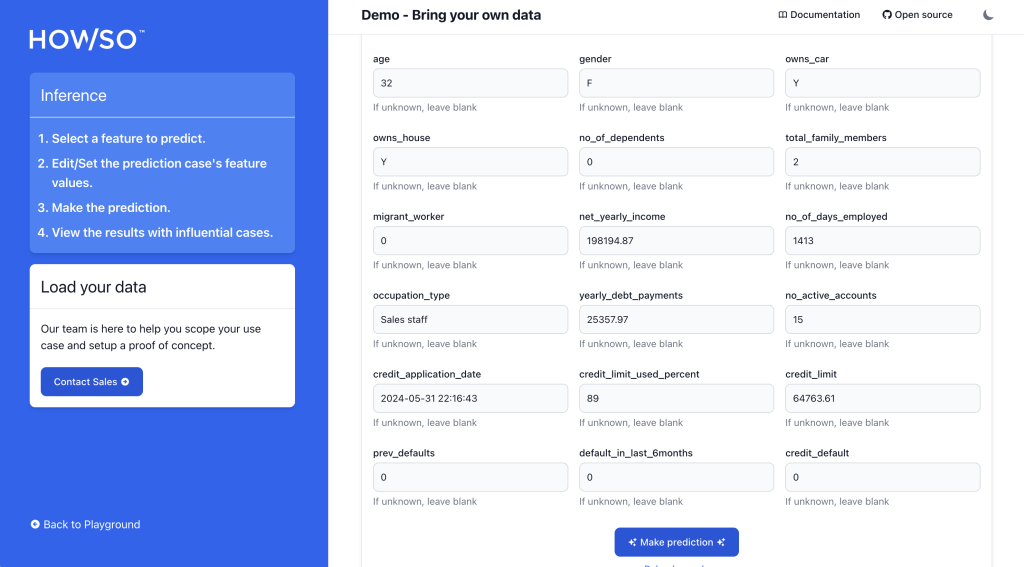
Once you’ve followed steps 1-5, you can complete the final step of the demo by choosing a feature to predict.
Data is at Our Core
At Howso, data is at the heart of everything we do. Our approach to AI is data-driven and innovative, creating a new standard for transparency and interpretability in artificial intelligence. Unlike traditional AI, which can often seem opaque, Howso’s technology focuses on Understandable AI, offering clarity at every stage of your workflow.
Check out the Bring Your Own Data Demo for yourself here. If you’d like to learn more about how Understandable AI® can help your organization, drop us a note here.
• • •